
SASSA Status Check& SRD R370 Payment Dates
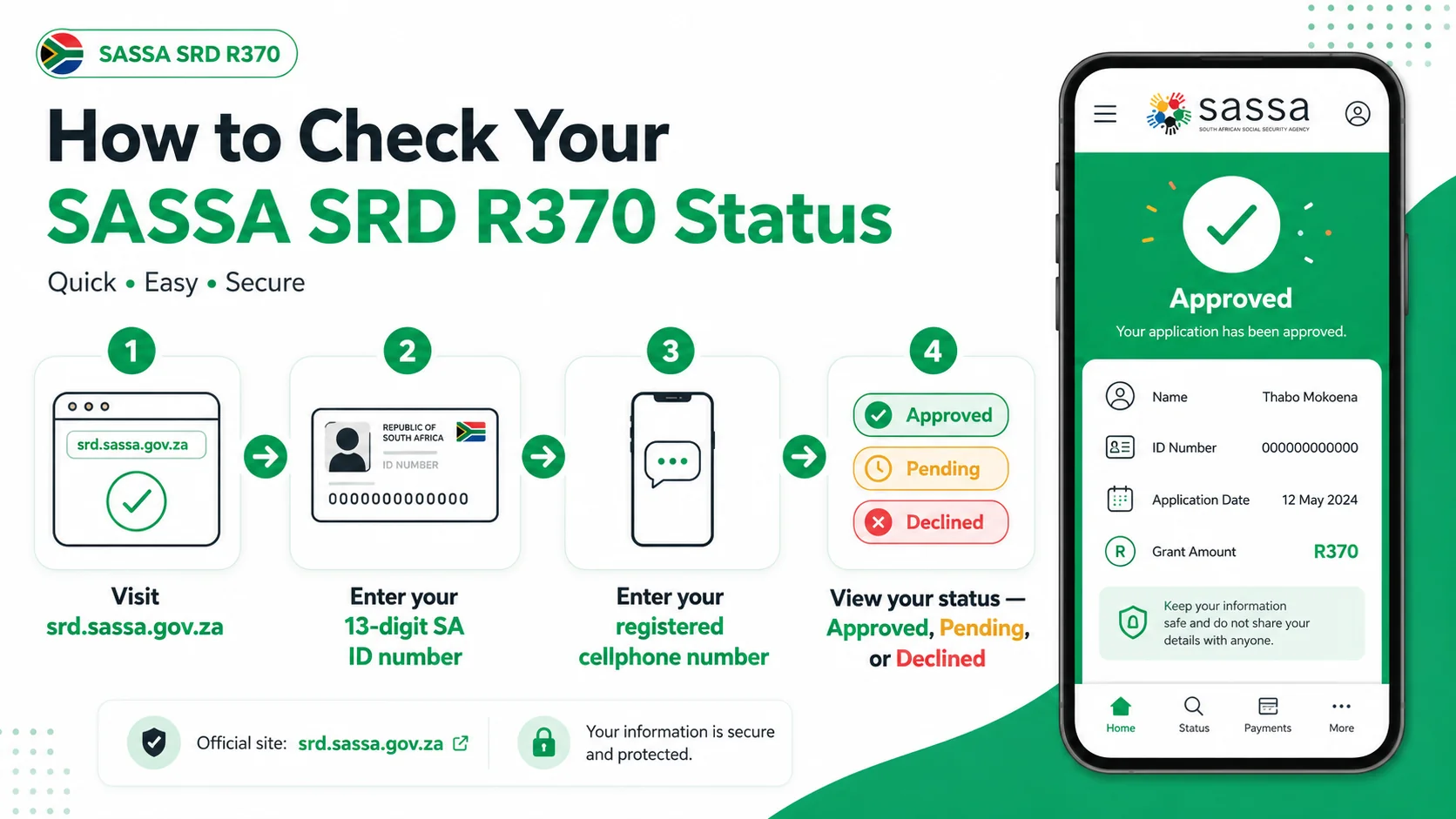
All grant recipients can securely verify their SRD application progress online by providing their 13-digit identity number and linked mobile phone. The system evaluates you every month and will return a status of Approved, Pending, or Declined.
Access the Online Status Portal
Hit the button below to navigate to the secure government database. Keep your ID book and registered phone handy.
Check Status on Official Portal🔒 We do not collect your personal information. You will be redirected to the secure srd.sassa.gov.za site.
What Does Your SASSA SRD Status Mean?
Your status shows where your application stands for that month. Here is what each result means and what to do next.
Approved
You have successfully qualified for the current month. A specific payday will be allocated shortly.
Approved but missing a date? →Pending
Your application is actively undergoing security checks against national state databases.
Explore the Pending phase →Declined
You did not pass the means test this month. A detailed rejection reason will be displayed.
Understand your rejection →All Possible Status Results
Including less common statuses that can appear on your portal dashboard.
| Status | What It Means | What To Do |
|---|---|---|
| Approved | You qualify for this month — a pay date will be assigned. | Wait for your pay date to appear. Check after the 20th of the month. |
| Pending | Verification still in progress against SARS, UIF, DHA databases. | Wait 7–14 days and re-check. Do not reapply. |
| Declined | Not approved — a specific reason is shown (UIF, NSFAS, Income, etc.). | Read the reason and appeal within 30 days if incorrect. |
| Referred | Sent for extra identity/fraud verification. Not a decline. | Complete your eKYC verification. Usually resolves within a few weeks. |
| Bank Details Pending | No valid account to pay into, or account is still being verified. | Confirm your account is active and in your name via banking details. |
| Reapplication Required | Your application has lapsed — a fresh declaration is needed. | Log in to srd.sassa.gov.za and complete the reapplication form. |
| Cancelled / Suspended | Grant was closed or temporarily paused, usually after a failed ID check. | Complete eKYC or call SASSA on 0800 60 10 11 immediately. |
| No Record Found | The ID and phone number entered do not match any application. | Use the exact phone number you applied with. Update via change number if needed. |
The Online Status Audit Process
Use these straightforward instructions to pull your latest profile data from the national portal.
SASSA SRD R370 Payment Dates
The agency distributes the R370 relief funds in staggered batches. For August 2026, the disbursement window runs from 27 August 2026 until 31 August 2026.
| Day of Week | Scheduled Date | Status |
|---|---|---|
| Thursday | 27 August 2026 | Confirmed |
| Friday | 28 August 2026 | Confirmed |
| Saturday | 29 August 2026 | Confirmed |
| Monday | 31 August 2026 | Confirmed |
Clearance Timelines
When does the cash become available?
All monthly payouts are handled sequentially during the final week of each month. Your specific date will be assigned directly to your profile.
- Traditional Bank TransfersIt generally takes 2 to 3 full business days after the official date for the banking network to reflect the funds.
- Retail Cash SendTypically available to be withdrawn on the exact scheduled date, or the immediate next business day at worst.
When Will Funds Reflect in My Account?
| Payment Method | When You Can Access Funds |
|---|---|
| Bank Account Transfer | 2–3 business days after your Pay Date |
| Cash Send (Retail) | Same day as Pay Date, or the next business day |
| SASSA Black Card | Usually on the Pay Date itself — swipe or withdraw at ATM |
SRD Appeal Status Check
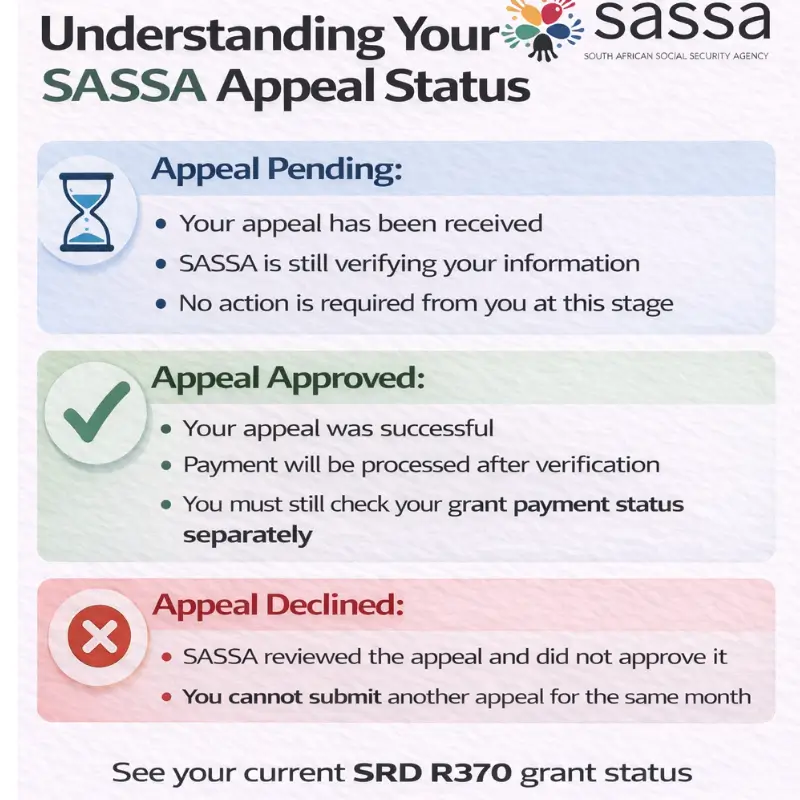
If you have already submitted an appeal for a declined month, check your appeal outcome via the ITSAA portal. This is a separate check from your monthly grant status.
eKYC Verification Status
SASSA requires all SRD applicants to complete biometric identity verification (eKYC) before any payment can be released. Have you submitted your facial scan?
- Verification Pending
- Verified
- Failed / Not Verified
Other Methods to Check Status
The official SASSA SRD portal is the most reliable method and shows your full month-by-month history. If you cannot access it, use any of the alternatives below.
Portal not loading?
The SASSA portal gets overloaded in the last week of the month when millions check at once. Wait 2–4 hours and try again, or use WhatsApp or USSD below as an alternative while the site is busy.
1. WhatsApp
A convenient option for a quick status result without needing a browser.
- Save 082 046 8553 in your contacts as "SASSA Official"
- Open WhatsApp and send the word "Status"
- Follow the prompts and provide your ID number
2. USSD CodeNo Internet
Works on any South African cell phone without data or a smartphone.
- Dial *134*7737# from your registered SIM
- Select the SRD status option from the menu
- Enter your ID number when prompted
3. SMS
Send a quick text message to receive your status update.
4. Toll-Free Call Centre
Speak directly with a SASSA agent for assistance.
(Monday to Friday 08:00–16:00)
Follow the voice prompts for SRD status.
5. Moya AppData Free
The Moya App allows you to check your status without using any mobile data.
Other SASSA Grants
Information on permanent social grants provided by SASSA.
Protect Yourself: SRD Scams
SASSA will never send you a WhatsApp message asking for your OTP, ID number, or banking details. They will never ask you to pay any fee to approve or speed up your application.
Beware of fake "SASSA agents" on social media offering to fix a pending or declined status for a fee. No individual can manually change your SASSA status.